
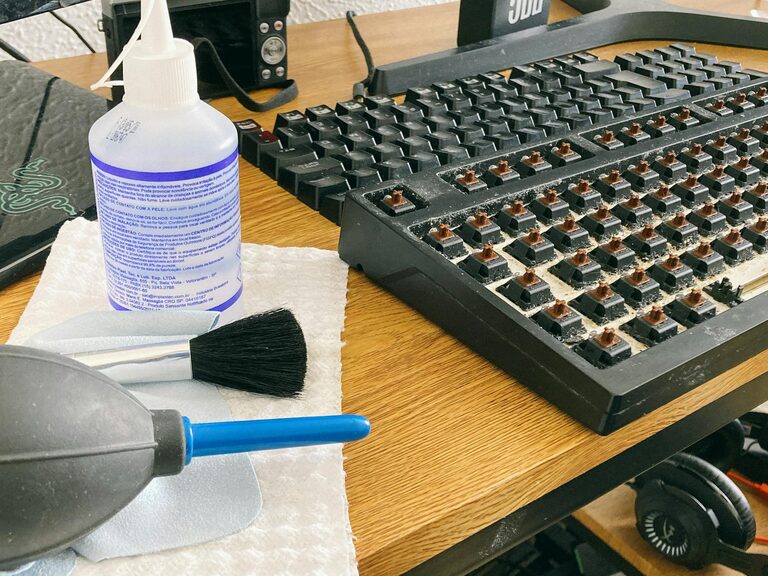
Keeping your phone and keyboard clean isn’t just about appearance—it helps reduce germs and keeps your devices working smoothly. Because we use these gadgets every day, they can collect dirt, dust, oils, and bacteria. Cleaning them regularly is a smart habit, but it’s important to do it safely to avoid damage.
In this guide, we’ll walk you through easy and effective ways to clean your phone and keyboard without causing harm.
Why Clean Your Phone and Keyboard?
Phones and keyboards often come into close contact with our fingers, faces, and even crumbs or spills. Over time, grime builds up, which can:
– Harbor bacteria and germs
– Affect the responsiveness of touchscreens and keys
– Cause discoloration or sticky residue
– Reduce the lifespan of your devices
Keeping them clean protects both your health and your tech investment.
General Safety Tips Before You Start
Before cleaning, keep these tips in mind to avoid damage:
- **Power off your devices** — Always turn off your phone and unplug your keyboard or computer.
- **Unplug and detach accessories** — Remove cases, cables, and external parts if possible.
- **Avoid harsh chemicals** — Stay away from bleach, ammonia, or abrasive cleaners.
- **Use soft, lint-free cloths** — Microfiber cloths work best and help prevent scratches.
- **Dampen, don’t soak** — Never spray liquid directly on devices; lightly moisten cloths instead.
How to Clean Your Phone Safely
Phones have delicate screens and electronic components, so gentle care is key.
Supplies Needed
– Soft microfiber cloth
– Distilled water
– Isopropyl alcohol (70% or less) or pre-made electronics-safe wipes
– Cotton swabs (optional)
– Small soft brush (optional)
Cleaning Steps
- **Remove your phone case** and any accessories. Clean the case separately with soap and water.
- **Power off** your phone.
- **Mix a cleaning solution** by combining equal parts distilled water and isopropyl alcohol in a small spray bottle. Skip this if using pre-made wipes.
- **Lightly dampen a microfiber cloth** with the solution. It should be just slightly wet, not dripping.
- **Wipe your phone’s exterior** gently, including the screen, back, and edges.
- Use a **cotton swab lightly moistened** to clean around buttons and ports. Be careful not to let moisture enter openings.
- **Dry the phone** with a clean, dry microfiber cloth.
- **Let your phone air dry** completely before turning it on or putting the case back on.
Additional Tips
– Avoid paper towels or abrasive cloths—they can scratch the screen.
– Don’t use household cleaners like window or kitchen sprays.
– For stubborn grime, repeat cleaning but always use minimal moisture.
How to Clean Your Keyboard Safely
Keyboards collect dust, food particles, and oils, which can affect typing and hygiene.
Supplies Needed
– Soft microfiber cloth
– Isopropyl alcohol (70%) or electronics wipes
– Compressed air canister
– Cotton swabs or soft brush
– Mild dish soap (for keycaps if removable)
Cleaning Steps
- **Unplug your keyboard** or turn it off if wireless.
- **Turn the keyboard upside down** and gently shake or tap it to dislodge loose debris.
- **Use compressed air** to blow out dust and crumbs from between the keys. Hold the can upright and spray in short bursts.
- **Lightly dampen a microfiber cloth** with isopropyl alcohol or use an electronics-safe wipe.
- **Wipe the surface and each key** thoroughly.
- For detailed cleaning, dip a **cotton swab lightly in alcohol** and clean around the edges of keys.
- If your keyboard has removable keys, carefully pop off the keycaps and clean them separately in warm, soapy water. Let them dry fully before reattaching.
- **Allow the keyboard to air dry** completely before plugging it back in.
Additional Tips
– Avoid getting liquid underneath the keys to prevent damage.
– Don’t soak the keyboard or spray liquid directly on it.
– Clean your keyboard regularly, especially during allergy season or after meals.
Maintaining Clean Devices
Cleaning your phone and keyboard regularly can keep them looking and working well. Here are extra tips to maintain cleanliness:
– Wash your hands before using devices.
– Keep food and drinks away from your workspace.
– Use screen protectors and keyboard covers for an added layer of protection.
– Wipe down devices weekly or more often if used by multiple people.
– Keep microfiber cloths handy for quick cleaning.
Final Thoughts
A clean phone and keyboard are not only more pleasant to use—they also contribute to better hygiene and device health. By following the simple, safe steps in this guide, you can protect your devices without risking damage. Remember to be gentle, use the right materials, and clean regularly for the best results!
Happy cleaning!