
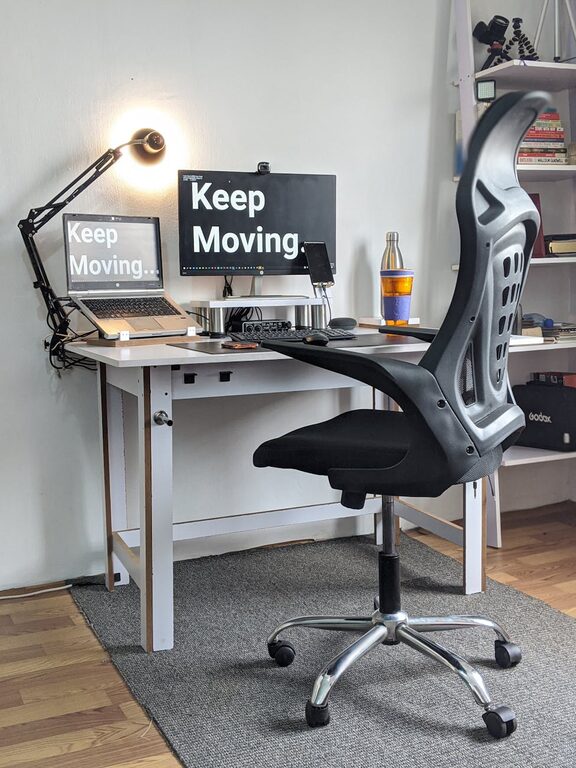
Desk Setup Tips for Focus and Comfort
Creating a desk setup that promotes both focus and comfort can transform your workday. Whether you work from home or in an office, the way you arrange your workspace influences your productivity and well-being. In this post, we’ll explore practical tips to help you organize your desk for maximum concentration and physical ease.
Why Your Desk Setup Matters
A cluttered or uncomfortable workspace can lead to distractions, aches, and fatigue. On the other hand, an organized and ergonomic desk setup supports better posture, reduces physical strain, and helps maintain mental clarity. Investing time to optimize your environment pays off in both efficiency and health.
—
Choosing the Right Desk and Chair
Desk considerations
– Size and surface: Ensure your desk provides enough space for your computer, essential tools, and still leaves room to write or use other materials.
– Height: A standard desk height (about 28-30 inches) works for most, but adjustable desks can be better if you vary between sitting and standing.
– Shape and style: Pick a desk shape (L-shaped, rectangular) that fits your room and workflow without crowding the space.
Chair essentials
– Ergonomic support: Look for a chair with adjustable height, lumbar support, and comfortable cushioning.
– Mobility: Wheels or swivel features help you reach various parts of your workspace without strain.
– Proper fit: Your feet should rest flat on the floor, with knees at about 90 degrees.
—
Organizing Your Desk for Better Focus
Keep essentials within reach
Place commonly used items like your keyboard, mouse, notepad, and phone close by. This reduces unnecessary movements or distractions.
Declutter regularly
Limit the number of items on your desk to avoid visual distractions. Use trays, drawers, or organizers to store less frequently used items out of sight.
Use cable management
Tangling cords can create a messy look and complicate cleaning. Use clips, sleeves, or boxes to keep cables tidy and out of the way.
—
Optimize Lighting for Comfort and Productivity
Natural light
Position your desk near a window if possible. Natural light improves mood and reduces eye strain.
Task lighting
Add a desk lamp with adjustable brightness and direction. This helps illuminate your work area without glare or harsh shadows.
Reduce screen glare
Place monitors perpendicular to windows and use blinds or curtains to control excessive sunlight.
—
Setting Up Your Tech Properly
Monitor placement
– Position your monitor at eye level, about an arm’s length away.
– Use stands or monitor arms to adjust height and angle.
Keyboard and mouse
– Keep them at a height that allows your elbows to remain close to your body.
– Use a wrist rest to avoid strain during long typing sessions.
Additional accessories
Consider tools like noise-cancelling headphones, a second monitor, or a laptop stand, based on your work needs.
—
Incorporate Comfort Boosters
Add greenery
A small plant adds life to your space and may improve air quality.
Use ergonomic accessories
Footrests, adjustable desks, and anti-fatigue mats contribute to your long-term comfort.
Take regular breaks
Set a timer to remind yourself to stand, stretch, or take a short walk every hour to reduce stiffness.
—
Personalizing Your Workspace
A workspace that feels inviting encourages focus. Add personal touches like photos, artwork, or a favorite mug. Just be sure these items don’t create clutter or distractions.
—
Final Thoughts
Comfort and focus go hand-in-hand when it comes to creating a desk setup that supports your workflow. Taking time to organize your environment with practicality and your physical well-being in mind can enhance your productivity and make your workday more enjoyable.
Try implementing a few of these tips, then adjust based on what feels best for your unique style and needs. A thoughtfully arranged workspace truly makes a difference!
